
Table of Contents
- Why do good AI prompts matter for coding?
- What is the best formula for an AI coding prompt?
- How do you write AI prompts for debugging?
- What are the best AI prompts for code review?
- How do you prompt AI to refactor code?
- Can you use AI prompts safely? What should you never share?
- What mistakes should you avoid in AI coding prompts?
- FAQs
Short answer: To write a good AI prompt for coding, give the AI four things: a role (who it should act as), the context (your stack, files, and goal), one clear task at a time, and the output format you want back. Always paste the actual code or the full error message, and iterate on the answer instead of accepting the first draft. This simple structure works in ChatGPT, Claude, Gemini, Copilot, and any other coding assistant.
An AI coding prompt is the instruction you type into an AI assistant when you want help writing, fixing, or understanding code. Unlike a search query, it is a two-way conversation: the quality of the answer depends almost entirely on the quality of the question. Zyrro’s guide below shows you the exact formula, with copy-paste examples for debugging, code review, and refactoring.
Why do good AI prompts matter for coding?
A good AI prompt matters because AI coding assistants have no memory of your project and cannot see your screen. A vague prompt like “fix my login function” forces the model to guess your language, your framework, and what “fixed” even means — so you get a five-paragraph explanation and code that does not compile. A precise prompt with the stack, the symptom, the code, and the expected output regularly produces a working fix on the first try, with zero follow-up questions.
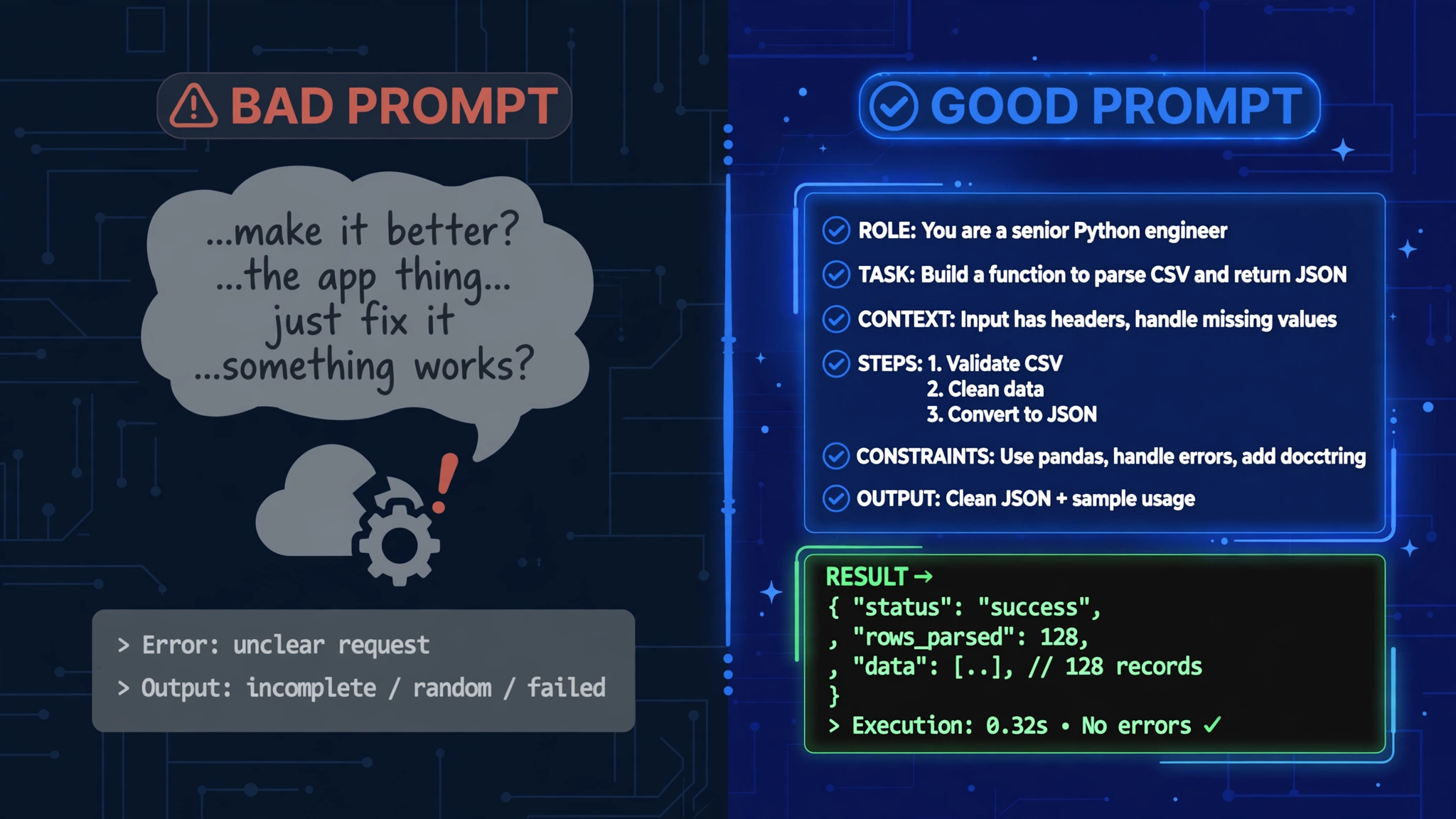
Tip: Treat prompting like calling a function: garbage input returns garbage output. Every missing detail becomes a guess the AI has to make — and guesses are where bugs are born.
What is the best formula for an AI coding prompt?
The best formula for an AI coding prompt is Role + Context + Task + Format. Give the AI a persona to act as, the background it cannot guess, one specific thing to do, and the shape the answer should take. Here is the formula in action:
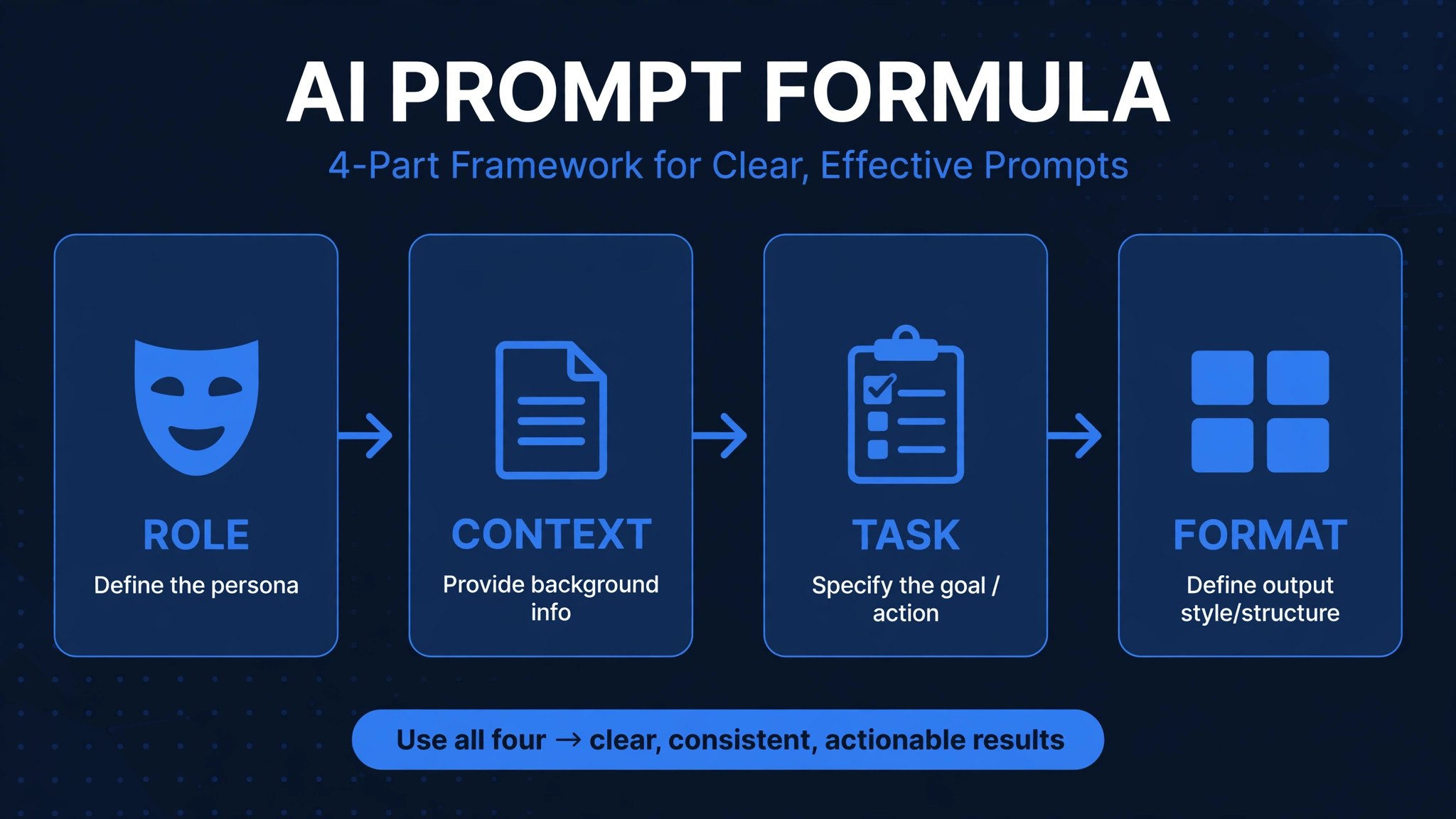
- Role — “You are a senior Python developer.” This sets the tone, depth, and vocabulary of the answer.
- Context — “I am building a REST API with FastAPI 0.110 and SQLAlchemy 2.0.” The model cannot guess your stack, so tell it.
- Task — “Add a POST /users/{id}/deactivate endpoint that soft-deletes the user.” One clear job, not three.
- Format — “Show the code, then a 2-line explanation of why it works.” This stops rambling walls of text.
Tip: You do not need all four parts every time, but every part you add removes one guess. Start with Task + Context if you are in a hurry; add Role and Format when the answers feel off.
How do you write AI prompts for debugging?
To write an AI prompt for debugging, paste the full error message first, then the smallest block of code that reproduces the problem, then your environment. Follow these steps:
- Paste the complete error. Include the error message, stack trace, and line numbers. Partial errors lead to wrong diagnoses.
- Paste minimal code. Strip your code to the 20–30 lines that cause the problem instead of dumping 500 lines. Real code beats a description every time.
- Name the environment. Language and version matter — “Python 3.11” is not the same as “Python 3.8”. Include the framework and key libraries.
- Describe the trigger. Say what you were doing when it broke: “this happens when I submit the form with an empty email field.”
- Ask why, not just what. End with “explain why my approach failed and why your fix works” so you learn instead of just copying.
Copy-paste debugging template:
“Here is my error: [paste full error]. I am using [language + version, framework + version]. This happens when [specific action]. Here is the code: [paste 20–30 lines]. What is causing it, how do I fix it, and how do I verify the fix?”
This error-first technique is the single fastest way to get a correct fix in one shot. “It doesn’t work” wastes a turn; a full stack trace with context gets you a precise answer.
What are the best AI prompts for code review?
The best AI prompts for code review ask for specific categories of feedback instead of a generic “review this”. Compare the approaches:
| Weak code-review prompt | Good code-review prompt |
|---|---|
| “Review this code.” | “Review this function for performance issues, edge cases, and readability. Suggest improvements with explanations.” |
| “Is this good?” | “Check this endpoint for security issues: unvalidated input, missing auth checks, and SQL injection. List each issue with severity.” |
| “Make it better.” | “Refactor this function to use early returns and clearer variable names. Do not change the behavior. Show before and after.” |
Tip: A good ai prompt for code review always names what to review for. An AI asked to “review” everything reviews nothing well; one asked for “edge cases and naming” will find both.
How do you prompt AI to refactor code?
To prompt AI to refactor code, paste the exact code, state the goal in one sentence, set hard boundaries, and ask for before-and-after output. Refactoring is where boundaries matter most — without them, the AI will “improve” your code by rewriting your architecture.
Copy-paste refactoring template:
“Refactor this function: [paste code]. Goal: [e.g. reduce nesting, improve readability]. Do NOT: add new dependencies, change the public API, or rename exported functions. Show the before and after code with a one-line note on what changed and why.”
Important: For changes touching more than one or two files, ask for a plan first — “Propose a plan. Do not implement.” — then approve the plan before letting the AI write code. This two-step flow keeps refactors safe in real codebases.
Can you use AI prompts safely? What should you never share?
You can use AI prompts safely if you treat the chat box like a public forum: never paste secrets, private keys, or real customer data. Before sending any code, strip out:
- API keys, tokens, and passwords — replace them with placeholders like
API_KEY=xxx. - .env files and private configs — these never belong in a prompt.
- Real user data — anonymize names, emails, and database rows first.
- Proprietary business logic — share only the minimum needed to get help.
Save the context you repeat every session — your stack, your conventions — in a persistent file instead of pasting it each time: a CLAUDE.md for Claude Code, a Cursor rule, or .github/copilot-instructions.md for GitHub Copilot. One file, set once, used forever.
What mistakes should you avoid in AI coding prompts?
- Being vague — “make the app better” gives the AI nothing to work with. Name the file, the function, and the outcome.
- Stacking three tasks in one prompt — write the API, add tests, and update the docs in separate prompts. One task at a time wins.
- Describing code instead of pasting it — never summarize code you can show. The model works with what it can read.
- Skipping the output format — without it you get paragraphs when you wanted code, or code when you wanted a plan.
- Accepting the first answer blindly — always run the code, run the tests, and review the diff. AI output is a draft, not a deliverable.
- Forgetting to verify — tell the AI how to check its own work: “tell me how to verify this fix” turns a guess into a tested answer.
If prompting still feels like guesswork, Zyrro’s free AI prompt generator walks you through it in three steps: pick the Coding category, choose a use-case like code debugging or SQL help, answer two quick questions, and get a polished, ready-to-paste prompt with a clear role, context, and output format built in. No signup needed.
Frequently Asked Questions
What makes a good AI prompt for coding?
A good AI prompt for coding includes four parts: a role (who the AI should act as), context (your stack, files, and goal), one clear task, and the output format you want back. Paste the actual code or the full error message, and never ask for three different things in one prompt. Specificity is the entire game — the more concrete details you give, the better the code you get back.
How do I write ChatGPT prompts for coding?
Write ChatGPT prompts for coding the same way you would for any assistant: start with a role like “You are a senior React developer”, add your stack and versions, paste the minimal code or the full error, state one task, and describe the format you want. For complex work, get better answers from ChatGPT by breaking the job into steps and iterating — see our guide to getting better answers from ChatGPT for the full technique.
How do I prompt AI to debug my code?
Use the error-first technique: paste the complete error message and stack trace, then the smallest block of code that reproduces the bug (20–30 lines), then your language and framework versions. Describe exactly what you were doing when it broke, and end by asking the AI to explain the root cause and how to verify the fix. Full context in, correct fix out.
What should I never put in an AI coding prompt?
Never put API keys, passwords, private keys, .env files, real customer data, or proprietary business logic into an AI coding prompt. Treat the chat box as public: replace secrets with placeholders and anonymize any real data before sending. Save repeated project context in a CLAUDE.md file, Cursor rule, or .github/copilot-instructions.md instead of pasting it every session.
Do AI coding prompts work for beginners?
Yes — beginners often benefit the most, because the AI can explain every line it writes if you ask it to. Add “explain this like I am a beginner and comment every line” to your format section, and use the “why did this fail” follow-up to learn from your mistakes. The 4-part formula works at every skill level; only the context you supply changes.
Is AI prompting a skill?
Yes — AI prompting is a real, learnable skill, and it is quickly becoming a core part of modern software development. Studies of developer workflows consistently show that engineers who prompt with structure (role, context, one task, format) get usable code far more often than those who type vague requests. Like any skill, it improves with deliberate practice: each iteration teaches you what the model needs.
What is the best AI prompt generator for coding?
The best AI prompt generator for coding is one that builds the proven structure for you: role, context, requirements, and output format. Zyrro’s free AI prompt generator does exactly that in three steps — pick the Coding category, choose a use-case like code debugging or SQL help, answer two quick questions, and copy the polished prompt into ChatGPT, Claude, Gemini, or Copilot. It is free with no signup.
In short: writing good AI prompts for coding is a skill, not a talent — and it is one you can learn in an afternoon. Start with the Role + Context + Task + Format formula, paste real code instead of describing it, keep one task per prompt, and always verify the output. Zyrro built its free AI prompt generator so you never have to start from a blank box again.