
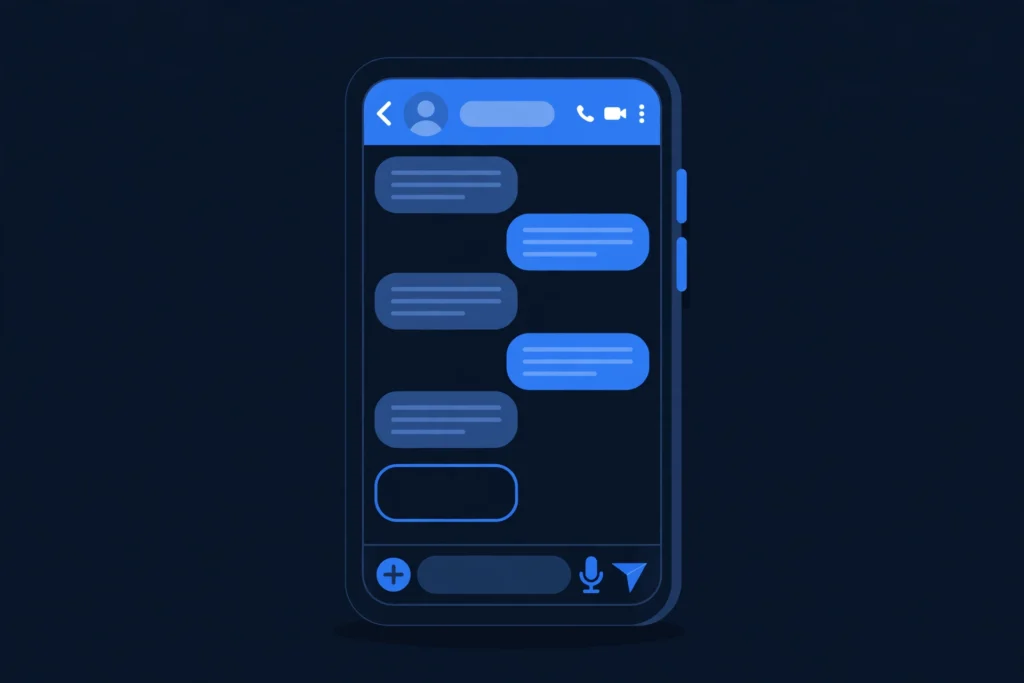
To send a blank message on Instagram, copy one invisible character, such as the Hangul Filler (U+3164) or the Braille Blank (U+2800), paste it into the message box in Instagram Direct Messages, and tap send. The message arrives as an empty bubble. Spaces alone do not work, because Instagram trims them before sending.
This guide from Zyrro shows which character to copy, how to paste it on iPhone and Android, how the trick behaves in comments, bios, and highlight names, and what to try when the message shows as a box or will not send. Test it with a friend before you use it anywhere that matters.
Table of Contents
- Can you send a blank message on Instagram?
- What is the blank symbol that makes a message look empty?
- How do I send a blank message on Instagram in a DM?
- How do I send a blank text on Instagram on iPhone and Android?
- How do I send a blank comment on Instagram?
- Can I use blank text in my bio, username, or highlight name?
- Why is my blank message not working?
- Should I send blank messages, and when should I avoid them?
- How is a blank message different from invisible text?
- Frequently Asked Questions
Can you send a blank message on Instagram?
Definition: a blank message contains real text characters but shows nothing visible, so the chat shows an empty bubble. Yes, you can send one on Instagram, but only with a workaround: Instagram has no blank-message button and cannot send a message containing nothing at all.
Normal spaces fail because Instagram trims leading and trailing spaces before sending, which leaves the box empty, and an empty box cannot be sent. An invisible character fixes that one problem: it is real text that takes up a position in the message, so Instagram accepts it, but it draws nothing on screen, so the bubble looks empty.
A blank message is therefore not an empty message. It is a message with content that no one can see. It counts toward the message length, it copies along with the text, and a field that filters unusual characters can strip it out. If Instagram changes how it handles these characters, the method can stop working, so always test it first where a failed attempt costs nothing.
Important: do not paste characters you cannot name from random posts. Some copied blanks carry extra hidden characters. Copy from a tool that names each character and shows its code, so you know what you pasted and can change it if it fails.
What is the blank symbol that makes a message look empty?
The blank symbol is an invisible Unicode character that occupies a position in text but shows nothing. The two that matter most are wide blanks, which behave like a real letter in most fields. The rest are zero-width characters, best kept as fallbacks.
Zyrro’s free invisible text generator lists six invisible characters, each with a copy button and its code. The table below names them in the order to try them, using the code names only. No invisible character is pasted anywhere in this article, so nothing on this page will copy a blank into your clipboard by accident.
| Character | Code | Type | When to use it |
|---|---|---|---|
| Hangul Filler | U+3164 | Wide blank | Try first. It passes in the most fields. |
| Braille Blank | U+2800 | Wide blank | Try second, if the Hangul Filler is trimmed or shows as a box. |
| Zero-Width Space | U+200B | Zero width | Fallback only. Some fields strip it out. |
| Zero-Width Non-Joiner | U+200C | Zero width | Fallback only, if the wide blanks fail. |
| Zero-Width Joiner | U+200D | Zero width | Fallback only, if the wide blanks fail. |
| Word Joiner | U+2060 | Zero width | Fallback only. It keeps text joined, rather than carrying a blank on its own. |
One character is enough for most blank messages. If one gets trimmed on send, try two or three of the same character before switching to a different one, and change only one thing at a time so you know which change fixed it. A longer blank string does not make the bubble look emptier.
There is no single official blank symbol. The Hangul Filler and the Braille Blank are simply the two wide blanks that survive pasting and sending most reliably, which is why guides name them first. If a guide gives you a blank without naming the character or its code, treat it as untested: you cannot troubleshoot what you cannot identify.
How do I send a blank message on Instagram in a DM?
To send a blank message in a DM, copy a blank string from a generator, paste it into the chat, and send it. The steps below use one Hangul Filler character.
- Open Zyrro’s Invisible Text Generator in your phone browser. Tap the copy button on the Hangul Filler (U+3164), or build a blank string of 1 in Step 2 and tap Copy blank string. Check the count shown on the tool, so you know the clipboard holds one character and not an empty copy.
- Open Instagram, go to Direct Messages, and open the chat.
- Tap the message box and paste: long-press the box and tap Paste, or use the Paste option that appears. Do not type anything else.
- Look at the send button. If the paste worked, the button should become active, even though the box still looks empty. If it stays grey, nothing was pasted: copy again and paste again.
- Tap send. Ask the other person what they see: a blank that looks right on your phone can still show as a box on theirs.
- If it does not send, or it arrives with a visible mark, switch to the Braille Blank (U+2800) and repeat the steps. If that also fails, try two or three Hangul Filler characters in one blank string.
Tip: test the method with a close friend first. Send one blank, confirm what the other phone shows, and only then use it in a group chat, where a strange box would look odd.

How do I send a blank text on Instagram on iPhone and Android?
Sending an empty message on an iPhone and on Android differs only in the copy and paste menus. The character, the generator, and the Instagram steps are the same. Menu labels can vary slightly by app version, so follow the Paste option your phone shows.
| Step | iPhone | Android |
|---|---|---|
| Copy the character | Open the generator in Safari and tap Copy on the Hangul Filler. If the button cannot reach the clipboard, select the character area manually and copy it. | Open the generator in your browser and tap Copy on the Hangul Filler. If the button cannot reach the clipboard, select the character area manually and copy it. |
| Switch to Instagram | Open Instagram, tap the messages icon, and open the chat. | Open Instagram, tap the messages icon, and open the chat. |
| Paste | Tap the message box, then tap Paste, or long-press the box and tap Paste. | Long-press the message box and tap Paste. |
| Send | Check that the send button is active, then tap it. | Check that the send button is active, then tap it. |
| If it fails | Copy the Braille Blank, or a blank string of two or three characters, and try again with a fresh copy. | Copy the Braille Blank, or a blank string of two or three characters, and try again with a fresh copy. |
On both systems, copy fresh for each blank message. Clipboards get overwritten constantly, and a stale clipboard is the most common reason a paste looks fine but the send button stays off. If in doubt, copy again and paste immediately.
How do I send a blank comment on Instagram?
To send a blank comment, use the same character and steps as a DM, but paste into the comment box under a post. Copy one Hangul Filler, open the post, tap the comment box, paste, and post. The comment should appear as an empty bubble.
Comments differ from DMs in two ways. A comment is public, and several blank comments in a row can read as spam. Instagram also filters comment input, so a character that survives in a DM can be stripped in a comment box. Test a blank comment on your own post first, where you can delete it in seconds.
If the comment box clears, the character was probably stripped on posting. Try the Braille Blank, then a two- or three-character blank string. If the comment posts but shows a box, the problem is the viewing phone’s font, and switching characters is the only fix. Do not post the same blank comment many times: repeated blanks look like spam and can get comments hidden or limited.
Can I use blank text in my bio, username, or highlight name?
Each of these fields has its own rules about which characters it accepts. A blank that works in a DM can fail in a username, and one that works in a bio can look broken in a highlight name. Test each field on its own, and keep a visible fallback ready so you can undo the change.
Your bio is the most forgiving. Blank text usually pastes into a bio, and a short blank can create an empty line. Keep it short: a bio full of invisible characters is hard to read and hard to search. If the field drops the character, try the Braille Blank, or edit from a desktop browser.
Your username is the strictest. Instagram usernames follow strict character rules, and decorated Unicode characters, including invisible ones, are usually rejected. A fully blank username is not realistic, and chasing it risks losing the name you want. Keep your username readable.
A highlight name sits in between. A short blank can leave it looking empty and minimal, but the result depends on the viewing phone, and a highlight with no visible name is harder to identify. Try it on one you can rename back, keep the cover image clear, and check from a second phone first.
Why is my blank message not working?
When a blank message does not work, the cause is almost always one of four things: nothing was copied, the character was trimmed, the viewing phone cannot draw it, or the field stripped it. Change one thing at a time, and retest after each change.
| What you see | Likely cause | Try this first |
|---|---|---|
| The send button stays grey after pasting | Nothing was pasted, or only spaces were pasted and Instagram trimmed them. | Copy the Hangul Filler again and paste immediately. Check the tool’s count display first. |
| The message shows as a small box or a question mark | The viewing phone’s font has no glyph for that character. | Switch to the Braille Blank and send a fresh blank. Ask the other person what they see. |
| The message sends but arrives with a visible mark | The character survived, but the receiving font renders it visibly. | Try the other wide blank. If both show a mark on that phone, it will not display a clean blank. |
| The comment box clears and nothing posts | The comment field stripped the character on posting. | Try the Braille Blank, then a two- or three-character blank string. Test on your own post first. |
| It works on your phone but not on a friend’s phone | Different fonts and app versions draw invisible characters differently. | Try the other wide blank and keep the string short. One character is easier for every phone to handle. |

Two mistakes make troubleshooting harder: pasting the same clipboard contents again and expecting a different result, and changing the character, count, and field all at once. If a paste failed, copy fresh and paste at once; change one thing at a time.
If no character works in a field, accept the field’s answer. Some fields strip non-standard input, and no invisible character is guaranteed to pass every filter on every app version. This method works in Instagram DMs in the common case, but it is a workaround that depends on how Instagram handles input today, not a promised feature. When a field refuses every blank, use visible text.
Should I send blank messages, and when should I avoid them?
Blank messages work best when everyone understands the joke: a single blank among friends, a playful pause, or a test of your own setup. Problems start when a blank confuses, misleads, or floods a conversation, because an empty bubble carries no information.
Avoid blanks where clarity matters. Do not use one to answer a question, confirm a plan, or reply to someone waiting on information: the other person must guess whether you meant to send nothing, whether the message failed, or whether you are ignoring them. Never put anything important in a blank: a screen reader may announce the hidden character or skip it.
Also avoid sending blanks repeatedly, to strangers, or in public comment threads, where they read as spam. One blank is a joke; ten blanks are flooding, and flooding gets comments hidden and accounts limited. In a large group where most people do not know you, a blank is just an empty bubble from a stranger.
The same method travels to other apps, with the same cautions. See how to send a blank message on Discord and how to send a blank message on Telegram, and for WhatsApp, how to send invisible text on WhatsApp. Each app trims and filters input differently, so test the character in that app itself.
How is a blank message different from invisible text?
A blank message, invisible text, and an empty comment are overlapping ideas, and mixing them up is why many guides contradict each other. The table below separates them by what is sent and where it appears. All three rely on the same invisible characters, but they are not the same action.
| Term | What is sent | Where it appears |
|---|---|---|
| Blank message | One or more invisible characters, with no visible text. | A chat bubble in Direct Messages that looks empty. |
| Invisible text | Invisible characters used on their own, or hidden inside visible text. | Any text field: messages, bios, captions, names, or inside a sentence. |
| Empty comment | One or more invisible characters, with no visible text. | A comment under a post that looks empty. |
| Blank text | A general name for any of the above, or for a copied blank string. | Wherever the blank string is pasted. |
The key distinction is between a blank on its own and invisible characters hidden inside visible words. Hiding them inside a sentence can change how text is searched or copied, and break text in ways that are hard to undo. This guide covers only blanks on their own. To inspect received text, the reveal step on the Invisible Text Generator tool shows every hidden character with its code and count.
Frequently Asked Questions
Can you send a blank message on Instagram?
Yes. Instagram has no blank-message button, but copying an invisible character, such as the Hangul Filler (U+3164), pasting it into the Direct Messages box, and tapping send works. The message arrives as an empty bubble. Spaces do not work, because Instagram trims them.
How do I send a blank text on Instagram?
Copy one Hangul Filler character from an invisible text generator, open Instagram Direct Messages, open the chat, paste the character into the message box, and tap send when the send button becomes active. If the button stays off, nothing was pasted, so copy again and paste at once. Test the result with a friend first.
What is the blank character to copy and paste?
Try the Hangul Filler, code U+3164, first: a wide blank that passes in the most fields. Second choice is the Braille Blank, code U+2800. Both are named on Zyrro’s Invisible Text Generator. Avoid unnamed blanks from random posts: you cannot troubleshoot a character you cannot identify.
How do I type a blank space on Instagram?
You cannot type a blank space that survives sending, because Instagram trims leading and trailing spaces, which leaves the message box empty and the send button off. Instead, copy an invisible character and paste it into the box. The character is real text, so Instagram accepts the message, but it draws nothing, so the bubble looks blank.
Why does my blank message show as a box or a question mark?
The viewing phone’s font has no glyph for the character you sent, so it draws a placeholder box or question mark instead of nothing. Switch to the other wide blank and send a fresh blank. If both wide blanks show a mark, that phone will not display a clean blank.
Can I send a blank message on Instagram from an iPhone?
Yes. Open the generator in Safari, copy the Hangul Filler, switch to Instagram, open the chat, tap the message box, tap Paste, and send when the button becomes active. If the copy button cannot reach the clipboard, select the character area manually and copy it. The steps are the same on Android, with long-press to paste.
How do I make a text blank in a comment or a bio?
Copy one Hangul Filler, paste it into the comment box or bio field, and save or post. Test a blank comment on your own post first, keep bio blanks short, and do not expect a blank username: usernames usually reject invisible characters.
Blank messages follow a simple rule: copy a named invisible character, paste it where you want the empty bubble, and check what the other phone shows. Done once, with a friend, it is harmless fun. Done repeatedly, or where clarity matters, it only confuses people. For more text tools from Zyrro, start with the Invisible Text Generator.